The way Indian businesses communicate has changed fundamentally. Hybrid work models, geographically spread teams, and global client relationships have made a well-equipped conference room no longer optional. It has become the backbone of daily operations.
Yet, most organisations in India still rely on a laptop propped open at the end of a table and a built-in microphone that picks up everything except the speaker. The result is dropped calls, poor audio, frustrated participants, and meetings that achieve nothing.
Setting up a professional video conferencing room does not have to be complicated. With the right equipment and a clear plan, any office space can be transformed into a high-performance meeting hub. This guide walks you through every piece of hardware you need, how to arrange it, and the best practices that separate a good room from a great one. If you are exploring video conferencing solutions India businesses trust, this is where to start.
Before jumping into the equipment checklist, it helps to understand what is actually at stake. Research consistently shows that poor audio quality causes more meeting fatigue than poor video. When participants strain to hear, comprehension drops and engagement collapses within minutes.
A professional AV setup in the office signals something equally important: credibility. When a client joins a call and sees a crisp, well-lit feed with clear audio and smooth camera tracking, their confidence in your organisation rises immediately. The inverse is also true.
India’s corporate landscape is evolving fast. Startups, mid-size enterprises, and large corporations are all investing in hybrid meeting room equipment that supports seamless collaboration across cities, time zones, and devices. Getting this right is a competitive advantage, not a luxury.
A standard webcam placed on a laptop simply cannot cover a room. For any meeting space that seats more than three people, you need a dedicated room camera with wide-angle coverage, optical zoom, and smooth pan-tilt functionality.
The two most important options for Indian boardrooms and conference rooms today are the 4K PTZ camera and the AI auto-tracking PTZ camera.
4K PTZ Camera
A 4K PTZ camera India offices are adopting delivers ultra-high-definition resolution at 3840 x 2160 pixels. The pan, tilt, and zoom functionality allows you to frame different areas of the room with precision. This is essential for rooms where multiple participants sit across a wide table or where presenters move around during sessions.
Key features to look for include a wide field of view of at least 90 degrees, low-light performance, optical zoom of 12x or higher, and compatibility with leading software platforms such as Microsoft Teams, Zoom, and Google Meet.
AI Auto-Tracking PTZ Camera
The AI auto-tracking PTZ camera takes things further by using artificial intelligence to detect and follow the active speaker automatically. No one needs to operate the camera during a meeting. When a participant stands to present or moves to the whiteboard, the camera tracks them smoothly in real time.
This technology is particularly valuable in training rooms, town halls, and executive boardrooms where a single presenter addresses the group for extended periods. It eliminates the need for a dedicated camera operator and ensures remote participants always see the right person.
AL Vision offers both the 4K Auto-Tracking PTZ Camera and the 4K AI Auto-Tracking PTZ Camera for Indian businesses looking for reliable, high-performance video capture.
Audio quality is the single most critical factor in any video call. You can recover from poor video with a simple description of what is on the screen. You cannot recover from audio where participants cannot hear each other clearly.
The most practical solution for small to medium conference rooms is a wireless conference speakerphone. These devices sit on the meeting table, capture audio from all directions using omnidirectional microphones, and eliminate the background noise and echo that plague ordinary setups.
AL Vision provides two purpose-built options for Indian meeting rooms:
For larger boardrooms that seat 20 or more people, consider expanding the audio setup with ceiling-mounted microphone arrays or additional satellite microphone units that connect to the central speakerphone.
The display serves two audiences simultaneously: the people in the room who need to see remote participants and shared content, and the remote participants who need to see the room clearly through the camera.
Interactive Flat Panel for Meetings
An interactive flat panel for meetings is the most versatile display solution available today. Unlike a traditional projector or passive monitor, an interactive flat panel functions as a touchscreen whiteboard, a display for video calls, a digital annotation tool, and a presentation screen all in one device.
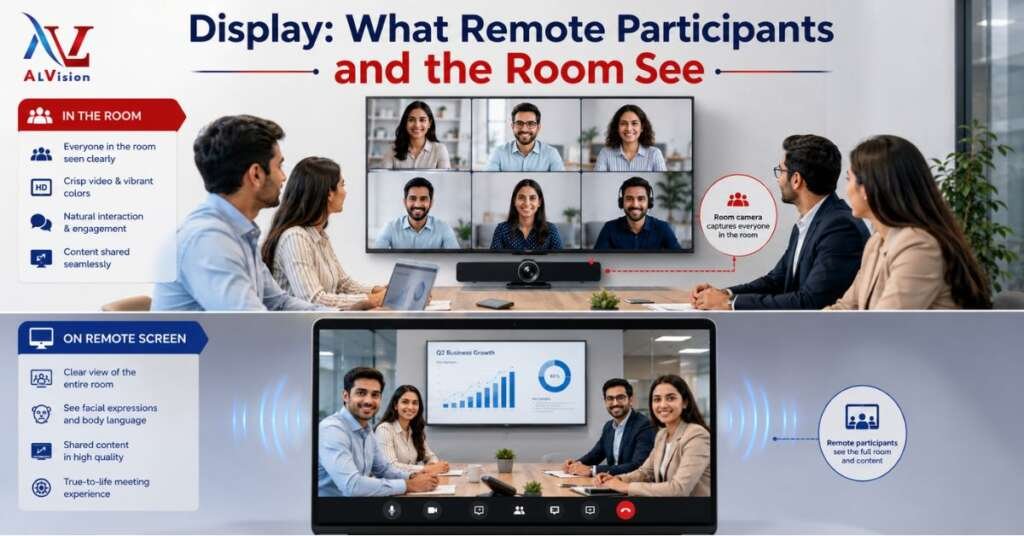
For video conferencing rooms, panels ranging from 65 inches to 98 inches are most commonly used. The touch capability allows participants to annotate directly on shared documents, draw diagrams during brainstorming sessions, and interact with content in real time.
When choosing a panel for a video conferencing room, prioritise 4K resolution, anti-glare coating, a high brightness rating of at least 350 nits, and built-in Android or Windows capability that allows the panel to run conferencing software independently.
Video Walls for Large Spaces
For very large conference halls or executive briefing centres, video walls create an immersive, high-impact visual experience that a single display cannot match. A video wall allows multiple feeds, content, and participant views to be displayed simultaneously across a seamless multi-screen arrangement.
Every professional video conferencing room needs a dedicated computing device that runs the conferencing software, manages camera inputs, handles audio routing, and connects to the network. This can be a room-optimised mini PC, a conferencing codec, or a compute module built into the display.
The key requirements are a modern processor capable of handling 4K video encoding and decoding, at least 8GB of RAM, Wi-Fi 6 and wired Ethernet connectivity, and compatibility with the video platforms your organisation uses most frequently.
Avoid using a personal laptop as the room computer. Laptops introduce variable performance, software conflicts, and the constant problem of participants unplugging the room system to charge their device.
The best camera, microphone, and display in the world will underperform if the underlying connectivity is unreliable. Professional video conferencing room setup requires dedicated attention to the following infrastructure elements:
Camera technology has advanced significantly, but no camera compensates fully for poor lighting. A participant who is backlit by a window behind them appears as a silhouette to remote colleagues. Overhead fluorescent lighting casts harsh shadows and makes skin tones look unflattering.
For professional results, follow these lighting principles in your video conferencing room setup:
Equipment alone does not make a great conference room. How you arrange the space determines whether the hardware performs to its potential.
Camera Placement
Mount the camera at eye level or just above. A camera placed too high looks down on participants and creates an unflattering angle. A camera placed too low creates a similarly unfavourable perspective. For most conference tables, eye-level camera placement means mounting on or just above the display.
Speaker and Microphone Placement
Place the wireless conference speakerphone at the centre of the table. In longer rooms, use two units positioned at intervals of two to three metres to ensure full coverage. Never place speakerphones directly under air conditioning vents, as airflow noise will interfere with voice pickup.
Display Positioning
The display should be positioned so that every seat in the room has a direct, unobstructed view. For standard conference rooms, this typically means mounting the interactive flat panel on the wall at the end of the table, at a height where the bottom of the screen is approximately 90 to 120 centimetres from the floor.
Acoustic Treatment
Hard surfaces reflect sound and create echo that even the best microphones struggle to suppress. In rooms with exposed concrete, glass, or tile, add acoustic panels to walls, place a rug under the conference table, and consider acoustic ceiling tiles. These changes dramatically improve the voice quality that remote participants hear.
Not every conference room is the same, and neither is every budget. Here is a practical guide to matching equipment to room size:
Small Huddle Rooms, seats 2 to 5
A compact 4K PTZ camera, a single wireless conference speakerphone, and a 65-inch interactive flat panel cover the requirements of a small meeting room very effectively. The setup is straightforward, installation takes half a day, and the total footprint is minimal.
Medium Conference Rooms, seats 6 to 12
A medium room benefits from an AI auto-tracking PTZ camera to follow speakers without manual operation, a higher-specification wireless speakerphone with extended pickup range, and an 86-inch interactive flat panel. Cable management and a dedicated room computer become more important at this size.
Large Boardrooms and Training Rooms, seats 12 and above
Large rooms demand a professional AV setup for the office that includes multiple microphone units, an AI auto-tracking PTZ camera or multiple fixed cameras controlled from a switcher, a large interactive flat panel or video wall, a robust room control system, and professional cable routing and rack infrastructure.
Hardware is only half the equation. The conferencing platform your organisation uses determines which features are available and how the equipment needs to be configured.
Microsoft Teams, Zoom, and Google Meet are the three most widely used platforms in Indian corporate environments today. When selecting video conferencing hardware in India, confirm that the camera, speakerphone, and room computer are certified or compatible with your chosen platform.
Teams-certified devices offer the deepest integration with the Microsoft ecosystem, including one-touch join for calendar meetings, automatic camera preset recall, and native room management through the Teams admin console. Zoom-certified devices offer similar capabilities within the Zoom environment.
If your organisation uses multiple platforms, select hardware that is platform-agnostic. Most USB cameras and USB audio devices work across all major platforms without requiring specific certification.
Setting up the room is the beginning, not the end. Keeping a professional video conferencing room in optimal condition requires consistent attention.
The adoption of professional video conferencing room setups across India has accelerated for several clear reasons. The return-to-office movement has not eliminated remote work. Instead, it has created a hybrid model where some team members are always in the office while others join remotely. A room designed only for in-person meetings fails this model completely.
Simultaneously, Indian companies are competing for global contracts and partnerships that require polished, professional remote communication. A poorly equipped conference room communicates the wrong message to an international client or partner.
The good news is that the cost of professional video conferencing hardware in India has decreased substantially as domestic manufacturing has grown. AL Vision, for example, manufactures and supplies a complete range of professional AV equipment including interactive flat panels, PTZ cameras, and wireless speakerphones, all designed specifically for Indian office environments and available with nationwide support.
Explore the complete range of video conferencing hardware India businesses use to upgrade their meeting rooms, or browse individual product pages to configure the right setup for your space.
To make this practical, here is a sample equipment configuration for a medium-sized Indian corporate conference room that seats eight to ten people:
This configuration handles everyday hybrid meetings, client presentations, training sessions, and executive briefings without compromise. Installation and configuration takes one to two days with a qualified AV integrator.
A professional video conferencing room is not defined by the size of the budget. It is defined by the quality of the decisions made at the planning stage. Start with the right camera that gives remote participants a clear, stable view of the room. Invest in audio that captures every voice clearly without background noise or echo. Choose a display large enough for every participant to see content comfortably. Build on a foundation of reliable network connectivity and clean cable management.
The equipment exists today to transform even a modest office meeting room into a space that rivals the best boardrooms in the country. Indian businesses that make this investment consistently report better meeting outcomes, stronger client relationships, and improved team collaboration across remote and in-office participants.Whether you are setting up a single huddle room or equipping an entire corporate campus, AL Vision provides end-to-end video conferencing solutions India businesses rely on, backed by BIS certification, Make in India manufacturing, and pan-India support. Reach out to discuss the right configuration for your space.